> ## Documentation Index
> Fetch the complete documentation index at: https://docs.layercode.com/llms.txt
> Use this file to discover all available pages before exploring further.
# Enable push-to-talk in React/Next.js
> Configure push-to-talk turn taking with the Layercode React SDK.
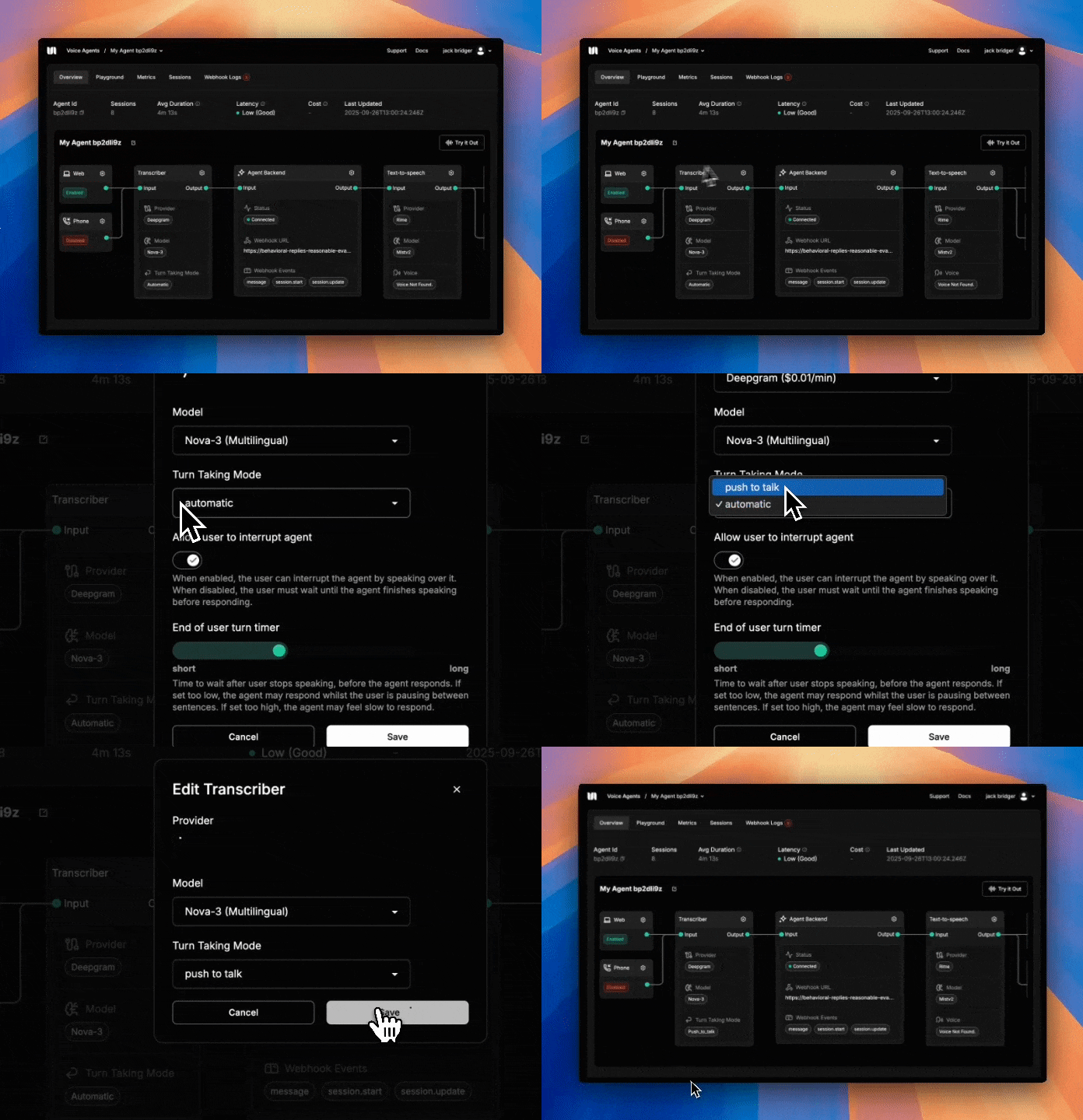
By default, Layercode agents use automatic turn taking. If you prefer explicit control—press and hold to speak—enable push-to-talk in your agent and wire up the callbacks in your UI.
## 1) Enable push-to-talk in the dashboard
In your agent panel on [https://dash.layercode.com/](https://dash.layercode.com/) → Transcriber → Settings → set Turn Taking to Push to Talk → Save your changes.
## 2) Use the React SDK callbacks
When using push-to-talk, call `triggerUserTurnStarted()` when the user begins speaking (pressing the button), and `triggerUserTurnFinished()` when they stop (releasing the button).
```tsx app/ui/VoiceAgentPushToTalk.tsx theme={null}
'use client';
import { useLayercodeAgent } from '@layercode/react-sdk';
export default function VoiceAgentPushToTalk() {
const { status, triggerUserTurnStarted, triggerUserTurnFinished } = useLayercodeAgent({
agentId: process.env.NEXT_PUBLIC_LAYERCODE_AGENT_ID!,
authorizeSessionEndpoint: '/api/authorize',
});
return (
);
}
```
Turn taking is explained conceptually in our [Turn taking guide](/explanations/turn-taking).
## What gets sent when you press the button
The React SDK continuously captures microphone audio into a short rolling buffer even while the button is idle. When you call `triggerUserTurnStarted()`, we immediately flush roughly one second of pre-roll audio along with anything you speak while the button stays down. This keeps the start of the utterance intact, so agents hear the full word instead of a clipped syllable.
You can fine-tune the pre-roll length with the `vad.buffer_frames` agent setting. Each frame represents about 100 ms of audio, so lowering the value shortens the buffer and raising it adds more context before the press.
 ## 2) Use the React SDK callbacks
When using push-to-talk, call `triggerUserTurnStarted()` when the user begins speaking (pressing the button), and `triggerUserTurnFinished()` when they stop (releasing the button).
```tsx app/ui/VoiceAgentPushToTalk.tsx theme={null}
'use client';
import { useLayercodeAgent } from '@layercode/react-sdk';
export default function VoiceAgentPushToTalk() {
const { status, triggerUserTurnStarted, triggerUserTurnFinished } = useLayercodeAgent({
agentId: process.env.NEXT_PUBLIC_LAYERCODE_AGENT_ID!,
authorizeSessionEndpoint: '/api/authorize',
});
return (
);
}
```
## 2) Use the React SDK callbacks
When using push-to-talk, call `triggerUserTurnStarted()` when the user begins speaking (pressing the button), and `triggerUserTurnFinished()` when they stop (releasing the button).
```tsx app/ui/VoiceAgentPushToTalk.tsx theme={null}
'use client';
import { useLayercodeAgent } from '@layercode/react-sdk';
export default function VoiceAgentPushToTalk() {
const { status, triggerUserTurnStarted, triggerUserTurnFinished } = useLayercodeAgent({
agentId: process.env.NEXT_PUBLIC_LAYERCODE_AGENT_ID!,
authorizeSessionEndpoint: '/api/authorize',
});
return (
);
}
```